
Common Maldives Traveller Declaration Mistakes
A field guide to the errors that cause real problems on the IMUGA form: names, passport data, timing, accommodation and the forgotten departure declaration.
The Maldives Traveller Declaration is a short form, and that is precisely why people rush it. Almost every problem reported at check-in or at Velana International Airport traces back to a handful of avoidable errors on the IMUGA submission: a name that does not match the passport, a mistyped document number, or a form filed outside the 96-hour window.
In 30 seconds: Most declaration problems are data-entry errors, not rule violations. The costly ones are a name that differs from the passport, a wrong passport number or expiry date, submitting outside the 96-hour window, filing one declaration for a whole family, and forgetting the departure declaration entirely. All of them are fixable before you fly by submitting a corrected declaration.
Why these mistakes happen at all
The form is filled in at a bad moment. Travellers open IMUGA the night before departure, on a phone, while packing, often after a long day. Autocomplete offers a nickname, the passport is in another room, and the accommodation booking is buried in an email thread. Under those conditions the error rate is predictable.
There is a second structural cause. The declaration asks for information that lives in four different places: the passport, the airline booking, the hotel confirmation and your own memory. Anyone who fills it in without those three documents open in front of them is guessing at least once.
The good news is that none of these errors is permanent. The declaration has no cost on the official IMUGA portal, so a corrected submission costs nothing but a few minutes. What makes an error expensive is discovering it at the counter instead of at home.
Quick summary: Errors come from rushing without the passport, ticket and booking to hand — and they are cheap to fix at home, expensive at the airport.
Passport data: name, number and expiry
Three fields on the form come straight off the passport data page, and all three are transcription risks. Together they account for the majority of counter incidents.
Mistake 1: a name that does not match the passport
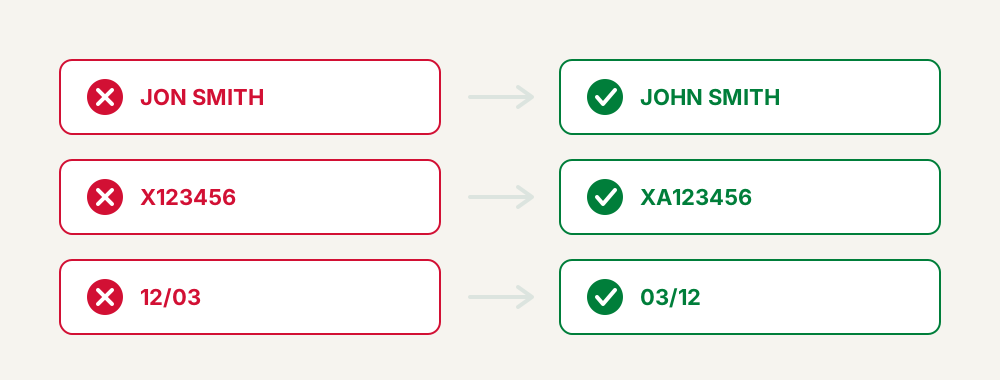
Why it happens. People type the name they use daily rather than the name printed on the passport. Spanish and Latin American travellers with two surnames often drop one. Married travellers use a married name that the passport does not carry. Autofill inserts a shortened first name.
What it costs. The name on the declaration must line up with the machine-readable zone of the passport. When it does not, the officer sees a mismatch and has to resolve it manually. At best that is a delay; at worst the airline hesitates to board you.
How to avoid it. Copy the name character by character from the passport data page, including every surname and every hyphen, and ignore accents that the passport itself omits. Do not abbreviate. Do not add titles.
Quick summary: Transcribe the name from the passport page, not from memory or autofill.
Mistake 2: a wrong passport number
Why it happens. Passport numbers mix letters and digits in ways that invite confusion — zero against the letter O, one against I, five against S. Reading a worn document under poor light makes it worse.
What it costs. This is the single most consequential typo on the form. The record will not resolve to your document at the counter, and staff must correct it manually or ask you to submit again on the spot.
How to avoid it. Photograph the passport data page and zoom in rather than reading the physical document. Then re-read the number backwards, digit by digit, on the review screen. Reading in reverse defeats the brain's tendency to see what it expects.
Quick summary: Zoom into a photo of the data page and verify the number backwards before confirming.
Mistake 3: the wrong expiry date
Why it happens. Confusion between the issue date and the expiry date, or between day-month-year and month-day-year formats. Travellers from countries using different conventions are especially exposed.
What it costs. Beyond the mismatch on the record, the expiry date matters in its own right: your passport should be valid for at least six months. A traveller who mistypes the date sometimes only then realises the real passport is too close to expiry to travel.
How to avoid it. Check both dates on the data page and note which is which. Then confirm you have six months of validity beyond your arrival date. If you do not, the declaration is the least of your problems — renew first.
Quick summary: Distinguish issue from expiry, respect the date format, and confirm six months of remaining validity.
The right form at the right moment
The next two errors are structural rather than typographic. Neither involves a misspelling; both involve filing something the system was not expecting.
Mistake 4: confusing arrival with departure
Why it happens. The Maldives requires two separate declarations per trip, one for arrival and one for departure. On a small screen the two options look similar, and a distracted traveller picks the wrong one.
What it costs. You arrive holding a departure declaration. The arrival record does not exist, so you effectively have not declared at all. Immigration will ask you to complete the correct form.
How to avoid it. Read the heading of the form before you start typing, and check the direction again on the confirmation email. The mechanics of both forms are covered in our guide to arrival and departure declarations.
Quick summary: Confirm the direction of the form before filling it in and again on the confirmation.
Mistake 5: submitting outside the 96-hour window
Why it happens. Organised travellers try to get the declaration done weeks in advance, along with insurance and transfers. The portal is designed for a narrow window and will not accept an early submission for a distant date.
What it costs. Too early means no valid declaration exists. Too late means a scramble at the airport, often on unreliable Wi-Fi, with a queue behind you.
How to avoid it. Set a calendar reminder for three days before departure. Count the 96 hours from your actual flight departure time, not from the date you leave home. Full details are in our guide to the 96-hour window.
Quick summary: Diary the submission for three days before the flight and count from the real departure time.
One traveller, one declaration
Mistake 6: one declaration for the whole family
Why it happens. The IMUGA session allows a family to submit together from one account, which many people read as "one form covers everyone".
What it costs. Only the person named on the record is declared. Everyone else arrives undeclared, including infants travelling on a parent's lap, and has to complete the form at the airport.
How to avoid it. Count your travellers and count your QR codes. They must match, and then double, because arrival and departure are separate. Families should read our guide on declarations for families and children.
Quick summary: One declaration per traveller, always — group submission is a convenience, not a shortcut.
Accommodation, email and the QR code
These three errors share a pattern: the declaration itself is fine, but something around it fails — the booking, the inbox or the saved image.
Mistake 7: unconfirmed or misspelled accommodation
Why it happens. Travellers enter the resort they intend to book, or type a name from memory. Maldivian property names are long and easy to mangle, and many islands host several properties with similar names.
What it costs. The accommodation field is not decorative. It is checked against your entry conditions, and an unbookable or unrecognisable entry invites questions at immigration. Travellers on a safari boat sometimes leave it blank entirely, which is worse.
How to avoid it. Open the booking confirmation and copy the property name and island exactly as written there. Book before you declare, not after. If you are on a liveaboard, use the vessel name as given on your confirmation.
Quick summary: Copy the accommodation name from the confirmed booking, and never declare a stay you have not booked.
Mistake 8: a typo in the email address
Why it happens. Fast typing on a phone keyboard, or a domain autocorrected to something similar. Nothing on the form warns you, because a typo still produces a syntactically valid address.
What it costs. The confirmation with your QR code goes to someone else, or nowhere. Your declaration exists, but you cannot display it. That gap is what causes the airport panic.
How to avoid it. Read the address twice on the review screen. Use a personal address rather than a corporate one, since work servers frequently quarantine external mail. If the email never arrives, retrieve the declaration on the portal instead of submitting a duplicate.
Quick summary: Verify the email twice and use a personal address that will not be filtered.
Mistake 9: not saving the QR code offline
Why it happens. The email arrives, the traveller sees it, and assumes it will still be there at the airport. Then roaming fails, or the airport Wi-Fi wants an SMS code that never comes.
What it costs. You have a valid declaration you cannot show. Staff can often find your record manually, but it takes time you may not have before boarding closes.
How to avoid it. Screenshot the code, save a PDF, and print a copy if you can. Test everything in airplane mode before leaving home. Our QR code guide covers offline storage in detail.
Quick summary: Store the QR in two offline formats and verify them with the phone disconnected.
The mistakes that surface last
The final two errors are the ones travellers discover latest — one on the return day, the other at the arrival counter after a long flight.
Mistake 10: forgetting the departure declaration
Why it happens. The arrival declaration feels like the real one. Once you are lying on a beach, the second form is easy to forget — and holiday days blur together.
What it costs. You reach the airport for your flight home without a declaration and have to complete it there, on resort Wi-Fi or airport data, while your transfer schedule runs out.
How to avoid it. Set a phone reminder for three days before your return flight, on the day you submit the arrival declaration. That is the single most effective preventive action in this entire guide.
Quick summary: Set the departure reminder at the same moment you submit the arrival form.
Mistake 11: declaring the connecting flight instead of the Maldives flight
Why it happens. Most travellers reach Malé via a hub — Doha, Dubai, Abu Dhabi, Istanbul, Colombo or Singapore. The itinerary shows two or three flight numbers, and the first one is the most visible.
What it costs. The declared flight does not match the flight you actually arrive on, so the arrival record cannot be reconciled at the counter. The system expects the segment that lands in the Maldives.
How to avoid it. Find the final segment of your itinerary — the one whose destination airport is MLE, GAN, NMF or HAQ — and declare that flight number, that airline and that date. On overnight connections, watch the date: the arrival segment may fall on the following calendar day.
Quick summary: Declare the last segment of the journey, the one that actually lands in the Maldives.
The error, the consequence and the fix
| Mistake | Consequence | Fix |
|---|---|---|
| Name differs from passport | Mismatch at immigration, manual checks, delay | Copy the name exactly from the passport data page |
| Wrong passport number | Record does not resolve to your document | Verify the number backwards on the review screen |
| Wrong expiry date | Data mismatch and possible validity problem | Distinguish issue from expiry; confirm six months validity |
| Arrival form used for departure | You arrive effectively undeclared | Check the direction on the form and on the confirmation |
| Submitted outside 96 hours | No valid declaration, or a rushed airport filing | Set a reminder three days before the flight |
| One declaration for the family | Everyone else is undeclared | One submission and one QR per traveller |
| Unconfirmed or misspelled accommodation | Questions at immigration on entry conditions | Copy the name from the confirmed booking |
| Typo in the email address | The QR never reaches you | Re-read the address twice; use a personal account |
| QR not saved offline | Valid declaration you cannot display | Screenshot plus PDF, tested in airplane mode |
| Departure declaration forgotten | Last-minute filing on your return day | Set the reminder when you submit the arrival form |
| Connecting flight declared | Arrival record does not match your flight | Declare the final segment landing in the Maldives |
Expert tip: Fill the form with three things open: the passport data page, the airline itinerary and the accommodation confirmation. Every field on the declaration comes from one of those three sources, and none of it should come from memory.
Quick summary: Almost every error maps to a missing document at the moment of filling in the form.
How to correct a declaration you have already sent
The practical answer in almost every case is to submit again with the correct data, while you are still inside the 96-hour window, and travel with the newest QR code.
- Identify exactly which field is wrong by comparing the confirmation with your passport and booking.
- Decide whether it matters. A missing accent is cosmetic; a wrong passport number is not.
- Open the IMUGA portal and file a corrected declaration for the same traveller and the same leg.
- Save the new QR code offline and delete or clearly rename the old screenshot.
- At the counter, present the newest code and mention that an earlier record exists.
Duplicate records are untidy, not disqualifying. Staff work from the most recent submission. The one thing you should not do is travel knowingly on a record you already know is wrong and hope nobody looks. For the wider picture, see what happens if you skip the declaration.
Quick summary: Resubmit inside the window, keep the newest QR, and flag the duplicate at the counter.
Expert tip: Not every error is worth resubmitting for. Correct anything on the passport, the flight or the accommodation. Leave typography alone — punctuation and accents do not create mismatches.
A checklist that prevents all eleven
Run this before you press confirm. It takes less time than reading this guide.
- Passport data page open, name and number copied rather than typed from memory.
- Passport valid at least six months beyond your arrival date.
- Correct form selected: arrival or departure.
- Flight number of the segment that lands in the Maldives, with the right date.
- Accommodation copied from a confirmed booking, island included.
- One submission open per traveller, infants included.
- Email address read twice, on a personal account.
- Review screen read aloud before confirming.
- QR screenshotted, saved as PDF and tested offline.
- Calendar reminder set for the departure declaration.
Quick summary: Ten checks, done once, remove every error described in this guide.
Key Takeaways
- The most damaging errors involve the passport: name, number and expiry date.
- Arrival and departure are separate declarations, and the departure one is the most commonly forgotten.
- The 96-hour window rules out early submission; diary it three days before the flight.
- Every traveller needs an individual declaration and an individual QR code, infants included.
- Declare the flight segment that actually lands in the Maldives, not the first leg of your itinerary.
- Almost any mistake can be fixed by resubmitting inside the window and travelling with the newest QR.
Frequently Asked Questions about Maldives declaration mistakes
Can I edit a declaration after submitting it?
The reliable route is to submit a corrected declaration inside the 96-hour window and travel with the newest QR code. Present that one at the counter and mention the earlier record.
Does a missing accent in my name cause a problem?
Generally no. Passports often omit accents themselves, and the check is on the letters. What matters is that no surname or word is missing or abbreviated.
What if I mistyped my passport number?
Fix it. This is the error most likely to cause a real problem at immigration, because the record will not resolve to your document. Submit a corrected declaration before you fly.
I only submitted one declaration for my family. What now?
Submit the missing ones. Every traveller, including babies on a parent's lap, needs their own declaration and their own QR code for each direction of travel.
Which flight do I declare if I have a connection?
The final segment, the one that lands in the Maldives. Use that flight number, airline and date, and check whether an overnight connection pushes the arrival into the next day.
What if my accommodation changes after I declare?
If the change is significant, submit a corrected declaration inside the window. A room upgrade at the same property is not worth resubmitting for; a different island is.
Is there a penalty for submitting twice?
No fee is involved, since the declaration has no cost on the official portal. Two records for the same leg simply create a little confusion, resolved by showing the most recent code.
I forgot the departure declaration. Can I do it at the airport?
You can, but it is stressful and depends on connectivity. Far better to set a reminder three days before your return flight, at the same time as you file the arrival form.
Does the declaration replace my visa?
No. It is an immigration formality. Most nationalities receive a no-cost 30-day visa on arrival with a valid passport, confirmed accommodation, a return ticket and sufficient funds.
What happens if the officer spots an error at the counter?
Usually a manual correction and a delay. Serious mismatches, such as a passport number that does not correspond to your document, can require you to complete a new declaration on the spot.
Last updated: July 2026. Immigration rules can change; always check the current requirements on the official Maldives Immigration portal before you travel.