
Maldives Traveller Declaration QR Code
A practical walkthrough of the IMUGA QR code: when it arrives, who scans it at check-in and immigration, how to store it offline and how to fix common failures.
The QR code is the only visible output of the Maldives Traveller Declaration. You submit the form on the IMUGA portal, the system emails you a confirmation, and inside that email sits a square black-and-white code. That code is what the airline agent scans at check-in and what the officer scans at Velana International Airport. Everything else about the declaration happens invisibly in the background.
In 30 seconds: Submit your Traveller Declaration on IMUGA within the 96-hour window before your flight. A confirmation email with a QR code arrives within minutes. Save it offline as a screenshot, PDF or printout. Show it at airline check-in and at Maldives immigration. You need one QR per person and one per leg — arrival and departure are separate submissions with separate codes.
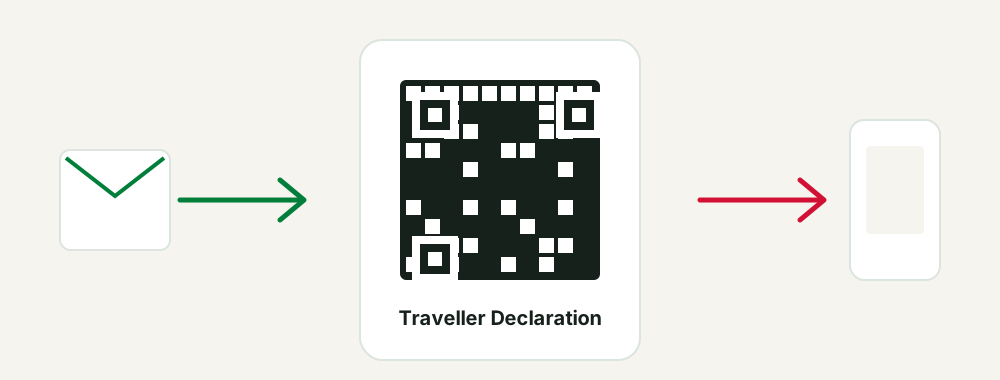
What the QR code actually is
The QR code is not a visa, a boarding pass or a health certificate. It is a machine-readable pointer to the declaration record you created on IMUGA. When a scanner reads it, the immigration system pulls up your submission: your identity details, your passport data, your flight, your accommodation in the Maldives and the health information you provided.
That distinction matters. Because the code only points at a record, it carries no value on its own. If the underlying declaration was submitted with a wrong passport number, the QR will still scan perfectly — and then the officer will see data that does not match the passport in their hand. A clean scan is not the same as a correct declaration.
The code is generated once per accepted submission. It is unique to one traveller and one direction of travel. There is no such thing as a shared family QR code or a round-trip QR code.
Quick summary: The QR code is a link to your IMUGA record, unique per traveller and per leg, and it proves submission — not correctness.
What information sits behind the code
Nothing readable is printed on the square itself, but the record it opens contains everything you typed into the form. In practice an officer scanning your code sees four blocks of information.
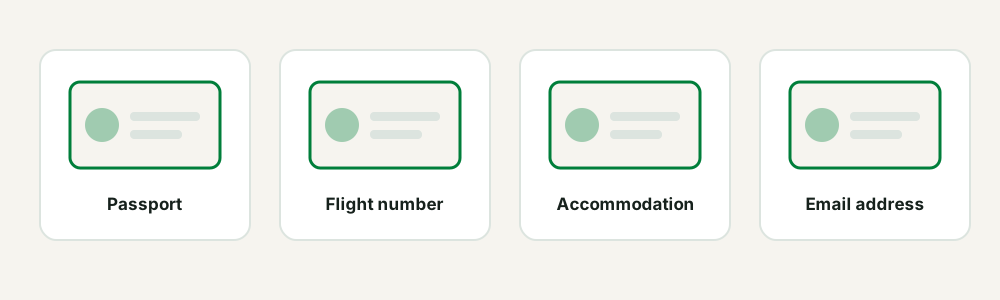
- Identity and passport. Full name exactly as written on the passport, nationality, date of birth, passport number and expiry date.
- Journey details. The flight you arrive on or leave with, the airline, the date, and the airport — Velana in almost all cases, occasionally Gan, Maafaru or Hanimaadhoo.
- Accommodation in the Maldives. The resort, hotel, guesthouse or safari boat where you will stay, plus the island. This is the field that most often trips people up, because it must be a confirmed booking rather than a plan.
- Health information. The declaration questions you answered during submission.
Alongside the square you will also see a short alphanumeric reference. Treat that string as the human-readable twin of the QR: staff can type it in if the optical scan fails for any reason.
Because all of this is stored server-side, the printed or screenshotted code is disposable. Losing the image never means losing the declaration. It only means you have to display the image again.
Quick summary: The code opens a record with your passport, flight, accommodation and health answers, plus a typeable reference number.
When and how the QR code reaches you
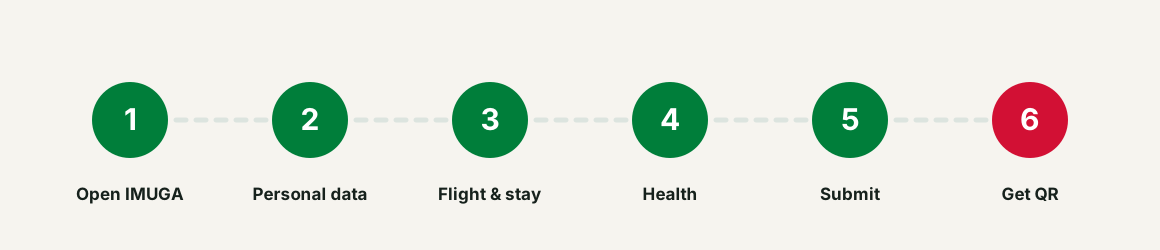
The sequence is always the same:
- You open the IMUGA portal and choose the arrival or departure declaration.
- You fill in personal, passport, flight, accommodation and health details.
- You review the summary screen and confirm the submission.
- IMUGA shows an on-screen confirmation containing the QR code.
- The same confirmation is sent to the email address you typed into the form.
Most travellers receive the email in under five minutes. Delivery can stretch to an hour when the portal is busy, typically during the European evening and the Gulf morning, when a large share of Maldives-bound traffic is being processed at once.
The on-screen version appears before the email. That is your first and safest capture point. Screenshot it immediately, while the page is still open, rather than closing the tab and hoping the email behaves.
Expert tip: Take the screenshot at the confirmation screen every single time, even if you expect the email. Recovering a lost confirmation later is far more annoying than pressing two buttons now.
Quick summary: The QR appears on screen first and by email second — capture the on-screen version before you close the page.
Where you will be asked to show it
There are two reliable checkpoints and a couple of occasional ones.
Airline check-in, at your departure airport. The airline is responsible for carrying only travellers who are documented for entry. Many carriers flying into Malé — including the Gulf hubs that dominate the route — ask for the Traveller Declaration QR before issuing a boarding pass. If you connect through Doha, Dubai, Istanbul or Colombo, you may be asked at the first airport, not at the connection.
Immigration at arrival in the Maldives. At Velana International Airport the arrivals hall funnels passengers past declaration checks before the passport counters. You present the QR, it is scanned, and the officer works from your record. The same applies at Gan, Maafaru and Hanimaadhoo, though volumes there are far smaller.
Occasionally you will also be asked by ground staff during boarding, or at the departure declaration check when you leave the Maldives. Resorts and guesthouses sometimes ask to see it too when they arrange your seaplane or speedboat transfer, purely to confirm you will clear immigration without delay.
A detail worth knowing: the check at Velana is fast when your code is ready and slow when it is not. Arrivals from the Gulf hubs land in tight clusters, so a single traveller searching an inbox on airport Wi-Fi holds up a queue of several hundred people. Having the image already open on your screen as you approach is the difference between five seconds and five minutes.
Quick summary: Expect the QR at airline check-in and at Maldives immigration; occasionally at boarding and at your accommodation's transfer desk.
How to store the QR code offline
Assume you will have no mobile data when you need it. Roaming may not activate, the airport Wi-Fi may require an SMS code you cannot receive, and your inbox may refuse to sync. Offline storage is not optional.
- Screenshot in your camera roll. The fastest method. Mark it as a favourite so you can find it without scrolling.
- PDF saved to device storage. Use your phone's "save to Files" or "download" option so the document lives outside the mail app.
- Printed copy on paper. Old-fashioned and completely reliable. Scanners read paper as well as screens.
- Mobile wallet pass. If your phone offers to add the confirmation to Apple Wallet or Google Wallet, accept — wallet items open without a network connection.
- Copy in a cloud folder set to offline access. Useful as a backup if your phone is lost or replaced.
Two rules make all of this work. First, brightness: set your screen high before you reach the counter, because dim screens under airport lighting are the single most common scan failure. Second, redundancy: keep the QR in at least two places, and ideally on two different devices within your travel party.
Avoid one popular but fragile habit: leaving the code only inside a mail app that syncs on demand. Many mail clients show a cached preview but refuse to load the embedded image without a connection, which means you see a blank rectangle exactly when you need the code. Take it out of the inbox and into the camera roll, the wallet or a file.
If you travel with a companion, cross-store. You keep their codes, they keep yours. A single dead battery then stops being a document problem.
Quick summary: Keep the QR in at least two offline formats, raise your screen brightness, and never rely on live email access at the airport.
If the confirmation email never arrives
A missing email is the most reported QR problem, and it is almost always recoverable. Work through the causes in order.
Check the spam and promotions folders. Automated government mail with an embedded image is exactly what aggressive filters flag. Search your whole mailbox for "IMUGA" or "Traveller Declaration" rather than browsing folder by folder.
Check the address you typed. A single wrong character in the email field sends the confirmation into the void. This is why the review screen exists — read the address character by character before confirming.
Check corporate and school mail filters. Work addresses often quarantine external mail with attachments. A personal address is a safer choice for travel documents.
Wait, then retrieve rather than resubmit. IMUGA lets you look up an existing declaration and re-display the QR. Retrieval is always preferable to filing a duplicate, because duplicates create two records for one traveller and one leg, which slows down the counter check.
If you are inside the last few hours before check-in and nothing works, submit again rather than travel without a code. A duplicate record is a minor inconvenience at a counter; no record at all can cost you a boarding pass. Understanding the consequences helps you judge the trade-off — see what happens if you skip the declaration.
Quick summary: Search the whole mailbox, verify the address you entered, and retrieve the existing declaration instead of submitting a second one.
When the QR code will not scan
Scanning failures are usually physical, not administrative. The record is fine; the scanner simply cannot read the image.
| Situation | What to do |
|---|---|
| Email has not arrived after an hour | Search the mailbox for "IMUGA", check spam, then retrieve the declaration on the portal |
| You typed the wrong email address | Retrieve the submission on IMUGA using your passport details and re-send or screenshot it |
| Phone screen is cracked or very dim | Raise brightness to maximum, or show the printed backup |
| Scanner reads nothing at the counter | Offer the reference number printed under the code so staff can search manually |
| You changed or lost your phone | Open the confirmation email on any device, or restore from your cloud backup |
| Screenshot is blurry or cropped | Re-open the original email and zoom so the full square, including its white margin, is visible |
| You submitted twice by mistake | Present the most recent QR and tell the officer there is a duplicate record |
| Arrival QR shown at departure | Submit the separate departure declaration; the arrival code is not valid for leaving |
| Travelling with family, only one code saved | Every traveller needs their own QR — retrieve the missing ones before you reach the airport |
| Details on the record are wrong | Submit a corrected declaration inside the 96-hour window and use the newest QR |
Three practical fixes cover most counter incidents: turn brightness up, remove any screen protector glare by tilting the phone, and make sure the white border around the code is not cropped out of your screenshot. Scanners need that quiet zone to lock on.
Expert tip: Note the alphanumeric reference number shown with your QR and write it on a card in your wallet. If every screen in your travel party dies at once, that number lets staff find your record manually.
Quick summary: Most scan failures are brightness, cropping or glare — fix those first, and keep the reference number as a manual fallback.
Validity, expiry and the 96-hour window
The Traveller Declaration is tied to a specific journey, so its QR code is tied to that journey too. You submit within the 96 hours before travel, and the resulting code covers that flight and that direction only.
This produces three consequences travellers often miss:
- A QR from a previous trip to the Maldives is worthless. Every visit needs a fresh submission.
- If your flight is rescheduled to a date outside the declared journey, submit again with the correct flight details.
- The arrival QR does not survive until your departure day. You will file a second declaration before leaving, and it generates its own code.
If you want the full mechanics of timing — when the window opens, what happens if you are too early, and how to handle overnight connections — read our guide to the 96-hour submission window. The two-declaration structure is covered in arrival and departure declarations.
There is also a quieter point about accuracy. The declaration has no cost on the official IMUGA portal, so there is no financial penalty for submitting a corrected version if something changes. If you discover an error in your record while you are still inside the window, the cheapest and cleanest fix is simply to file again and use the newest code. Assistance services are optional and paid; the declaration itself never is.
Quick summary: Each QR belongs to one journey and one direction; old codes are never reusable.
One QR per person, one per leg
This is the rule that causes the most confusion at check-in counters, so it deserves its own section.
Every traveller has an individual declaration record. That includes infants who travel on a parent's lap, children with their own passports, and elderly relatives who do not use smartphones. Each of them generates a separate QR code.
A family can submit everyone's declarations from a single IMUGA session and a single email address. That is convenient — but it produces four QR codes in one inbox, not one code covering four people. The adult holding the phone must be able to bring up each code individually, ideally with the traveller's name visible next to it.
Then multiply by two, because arrival and departure are separate. A family of four therefore ends up with eight QR codes across the trip. Label your screenshots. "QR-Anna-arrival" beats scrolling through eight identical squares while a queue builds behind you.
Families travelling with minors will find the specific details in our guide on declarations for families and children.
Quick summary: Multiply travellers by two legs to get your QR count, and label each screenshot with a name and direction.
Changing phones, sharing and privacy
If you replace your phone between submission and travel, nothing happens to your declaration — the record lives on IMUGA, not on the device. Re-open the confirmation email on the new phone and save the code again offline.
If you share the QR image with a travel companion so they can hold a backup, remember what the code represents: it unlocks a record containing your passport number and accommodation. Share it inside your travel party, not in public group chats or social posts. Photographs of QR codes posted online are a genuine, if avoidable, data leak.
Deleting the email after your trip is fine. The record itself is not deleted by removing your copy, and you will file a new declaration for any future visit anyway.
One more habit worth adopting: if you use a password manager or a secure notes app, drop the reference number and the traveller's name in there. It survives phone changes, it is searchable, and it is not exposed if someone glances at your camera roll.
Quick summary: The record is server-side, so new phones are harmless — but treat the QR image as sensitive personal data.
A simple pre-departure routine
Give yourself a short checklist and run it the evening before each flight. It takes three minutes and removes almost every airport surprise.
- Confirm you are inside the 96-hour window for the flight you are about to take.
- Open the confirmation email and check the name against your passport, letter for letter.
- Verify the passport number and expiry date on the record.
- Screenshot the QR and mark the screenshot as a favourite.
- Save a PDF copy to device storage as a second format.
- Print one paper copy per traveller if a printer is available.
- Switch to airplane mode and confirm every saved copy still opens.
- Repeat the whole routine for the departure declaration before you leave the Maldives.
If any detail on the record is wrong, do not try to argue it at the counter. Submit a corrected declaration while you are still inside the window and travel with the new QR. Our guide to common declaration mistakes explains which errors actually cause problems and which are cosmetic.
Quick summary: Run a three-minute check the night before each flight and repeat it for the departure declaration.
Key Takeaways
- The QR code is a pointer to your IMUGA record; a clean scan does not prove the data is correct.
- Screenshot the on-screen confirmation before you close the page, then rely on the email as a backup.
- You need one QR per traveller and one per direction — arrival and departure are separate submissions.
- Store the code offline in at least two formats and test it in airplane mode before leaving home.
- Most scan failures are brightness, glare or cropping, not a problem with your declaration.
- A missing email is usually a spam filter or a typo; retrieve the existing record rather than submitting a duplicate.
Frequently Asked Questions about the Maldives Traveller Declaration QR code
How long does the QR code take to arrive?
Usually under five minutes. During busy periods it can take up to an hour. If nothing has arrived after that, search your mailbox for "IMUGA" and check spam before assuming the submission failed.
Can I travel without the QR code?
You should not try. Airlines commonly ask for it before issuing a boarding pass, and immigration expects it on arrival. Even if staff can retrieve your record manually, it adds delay you do not need.
Is the QR code the same as a Maldives visa?
No. The declaration is an immigration formality. Most nationalities receive a no-cost 30-day visa on arrival, subject to a valid passport, confirmed accommodation, a return ticket and sufficient funds.
Do children and babies need their own QR code?
Yes. Every traveller has an individual declaration, including infants travelling on a parent's lap. A family can submit them together, but each person gets a separate code.
Can one QR code cover both arrival and departure?
No. The Maldives requires two separate declarations per trip, and each one generates its own QR code. The arrival code is not valid when you leave.
What if my flight changes after I submit?
If the new flight falls outside the details you declared, submit a fresh declaration inside the 96-hour window before the new departure and travel with the newer QR code.
Can I show the QR code on a smartwatch?
It sometimes works, but the screen is small and easy to misread. Use a phone or a printout as your primary copy and treat the watch as a last resort.
What happens if I submitted the declaration twice?
Two records exist for the same traveller and leg. Present the most recent QR and mention the duplicate. It is untidy but not usually a problem at the counter.
Does the QR code expire?
It is tied to the journey you declared. Once that flight has been taken, the code has no further use. Every new trip requires a new submission and a new code.
Can I retrieve the QR code if I deleted the email?
Yes. IMUGA allows you to look up an existing declaration using your passport and travel details, and the confirmation with the QR can be displayed again.
Last updated: July 2026. Immigration rules can change; always check the current requirements on the official Maldives Immigration portal before you travel.